

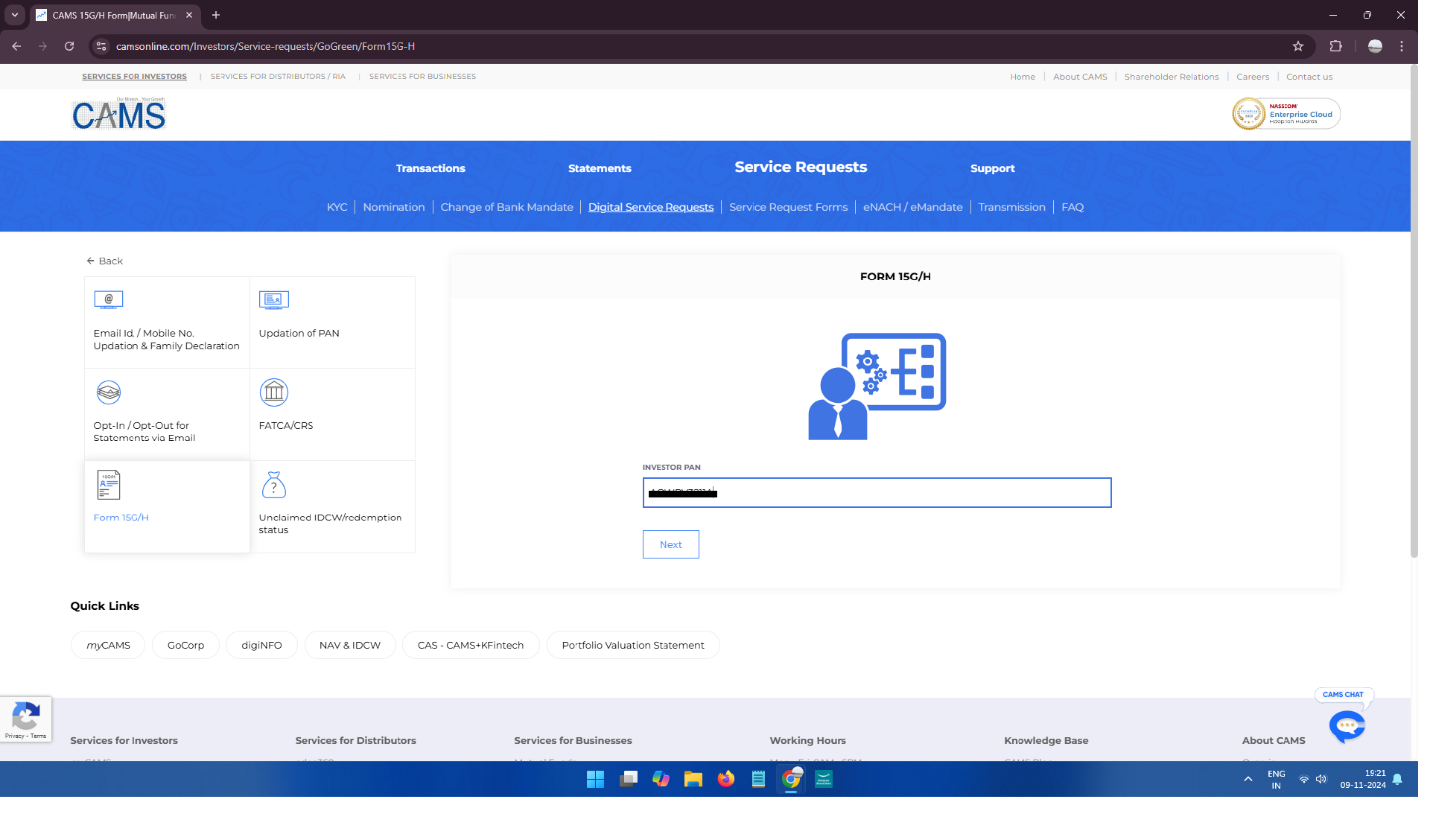
Online Submission of Form 15 G / 15 H BY Camsonline
Effective April 1, 2026, Form 121 replaces the older Form 15G and Form 15H for declaring that your total income is below the taxable limit to avoid TDS on interest or mutual fund redemptions. You can fill and submit this form through CAMS (Computer Age Management Services) both online and offline. New Process Check Here
To file Form 15G or 15H online for mutual funds via CAMS (Computer Age Management Services), which is a leading mutual fund registrar in India, follow these steps:
1. Go to the CAMS Online Portal
- Visit the CAMS official website.
2. Access the Form Submission Section
- On the homepage, find the “Investor Services” menu.
- find the “Digital Service Requests” menu.
- Select “Submit Form 15G/15H” or similar option, which allows you to file the form for avoiding TDS (Tax Deducted at Source) if eligible.
3. Enter Required Details
- Enter PAN number and select where do you want to generate OTP (Mobile or Email).
- Enter OTP and Fill Form 15G/15H Form.
4. Fill Out Form 15G or 15H
- Based on your eligibility (Form 15G if you’re below 60, Form 15H if you’re 60 or above), select the relevant form.
- Select 15G/15H , Select Mutual fund, Select, Folio Number, Estimated Income (from IDCW), Expected total Income*.
- Provide necessary details, such as income estimate, investment information, and declaration for non-deduction of TDS.
5. Upload Self-Attested Form (if required)
- You may need to upload a self-attested scanned copy of the form, especially if your mutual fund house requires it.
- Ensure the document is clear and legible to avoid delays.
6. Submit the Form
- Once filled, review all entered details to ensure accuracy.
- Submit the form online.
7. Confirmation
- After submission, you should receive a confirmation email or SMS indicating the successful filing of the form.
Important Notes
- Eligibility: Form 15G and 15H are meant for investors whose total income is below the taxable limit, thus exempting them from TDS.
- Annual Submission: This form is valid for one financial year, so you’ll need to re-submit it annually.
For assistance, you can also contact CAMS customer service directly.